We use cookies to make your experience better. To comply with the new e-Privacy directive, we need to ask for your consent to set the cookies. Learn more.

Monthly Archives: August 2026
-
 August 30, 2026
How to Choose the Right AV Setup for Your Event
Read more »Planning a party or meeting brings many moving parts. Sound and light often make or break the day. A bad mic ruins a great speech. Dark stages leave guests squinting. We know exactly how bad these feels. Often, the technology part seems like a foreign language to planners.
Our team at Wwave Audio Visual has seen it all. We have watched wrong cables delay big meetings. We have also seen perfect lights turn a boring hall into a magic space. Securing the proper equipment remains a very simple process. We will share several direct methods today to assist you in finding the ideal audio tools.
Understand Your Venue First
Rooms change how sound travels. High ceilings create terrible echoes. Outdoor spaces absorb bass energy fast. We always look at the physical space before doing anything else. A small boardroom needs very different tools compared to a large open warehouse.
Big windows cause glare problems for screens. Hardwood flooring disperses sound across the room. Observing these physical traits ensures you select the precise units you actually need.
Key Venue Checks
- Count the power outlets near the main stage area.
- Measure the ceiling height to ensure large screens will fit.
- Look for natural daylight that might wash out your video beams.
- Check for loading dock access to bring in heavy road cases quickly.
Select the Best Audio Equipment
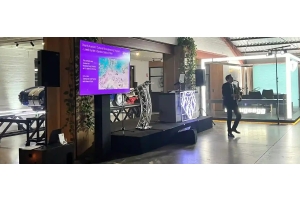
People must hear every single word clearly. The right AV setup depends heavily on your guest count. Fifty people in a quiet room just need a simple active speaker on a stand. Five hundred people outdoors require a huge system. They need subwoofers and extra speakers placed down the sides. We always ask about the crowd size first.
Speech needs different tools than live music does. A local DJ needs heavy, loud bass. A keynote speaker just needs crisp high tones to be understood.
Audio Tips for Clear Sound
- Use lapel microphones for speakers who walk around a lot.
- Choose wireless handheld mics for easy passing during crowd questions.
- Add a digital sound mixer to quickly stop loud feedback noises.
- Place all main speakers above head height for better sound reach.
Focus on High-Quality Visuals
Screens keep everyone fully focused. Nobody wants to look at a tiny television from the very back row. We suggest matching the display size to the room depth. A simple math rule helps here. The screen height should be at least one sixth of the distance to the last row of seats.
Bright daytime rooms need glowing LED panels. Dark indoor rooms work great with standard projection boxes.
Visual Gear Options
- LED Video Walls: Great for extremely bright rooms and massive stages.
- Laser Projectors: Perfect for controlled dark rooms and huge vivid images.
- Confidence Monitors: Hidden floor screens to help presenters read their notes.
- Fast Fold Screens: Easy to build quickly for fast business meetings.
Design the Right Lighting Atmosphere
Bright white ceiling lights feel exactly like a hospital ward. Warm colours create a highly inviting mood. We use lights to guide eyes right to the stage. A good event equipment hire package includes choices to change the room feeling entirely.
Lighting sets the emotional tone for the whole night. A soft blue wash feels calm. Bright red feels highly energetic.
Smart Lighting Choices
- Use battery-powered uplights to paint dull walls with rich, warm colours.
- Point a bright, clear spotlight directly at the main talker.
- Add moving headlights for evening parties or live music acts.
- Include a custom gobo light to beam your company logo on the back wall.
Do Not Forget the Power and Safety
All this amazing gear needs electricity to run. Plugging too many heavy items into one wall outlet causes blown fuses. A dead silent room is the worst thing to happen during a big talk. We carefully map out power limits before plugging in a single black cable.
Safety matters more than anything else today. Loose cables cause dangerous trips and bad falls.
Power Planning Steps
- Count the total power watts needed for all your rented gear.
- Order a quiet, silenced generator for remote outdoor locations.
- Tape down all loose floor cables with proper heavy-duty stage tape.
- Use strong power boards for really big technical setups.
Conclusion: A Smarter Way to Plan Your Event Tech
Finding the correct tools takes a little patience. Every single choice impacts how your guests feel on the day. We believe the tech should quietly support your main message. It should never become a loud, annoying distraction. Taking the time to measure the room and count the guests solves most tech problems early.
Our crew at Wwave Audio Visual is always ready to help you pick. We love
-
 August 28, 2026
Planning an Event? Here’s What You Need to Know About AV Before the Day
Read more »When we set up a business meeting, a family celebration, or a wedding party, we manage dozens of tiny details all at once. Catering arrangements, floor maps, and hall styling demand primary focus during early planning. It is quite common to leave gear choices to the very last week. Even so, clean audio output and sharp video displays remain the real heart of any function.
At Wwave Audio Visual, our crew helps planners change basic halls into remarkable spaces right across Melbourne. We put together this handy guide so you can handle key tech steps well before people step through the door.
1. Matching Equipment to Your Venue Space
Sound and room lights change fast depending on where you place your gear. Low concrete ceilings, massive wall windows, or heavy floor mats shift how voices carry and how screen pictures show up to guests.
Essential Room Factors to Evaluate:
- Ceiling height and rigging points: Low beam heights limit total screen dimensions. High ceilings mean we must aim top speakers down into the audience carefully.
- Natural daylight: Sun brightens up indoor spaces, but it washes out cheap projector images quickly. High-brightness units or an LED LCD TV hire setup will solve that issue easily.
- Power outlet locations: Wall plug positions tell us where cables must run. Using high-load power distribution boards protects main breakers from tripping during your programme.
Our technicians read floor layouts early when talking with venue managers. Getting suitable units booked upfront saves precious hours once setup starts on site.
2. Choosing Sound Systems That Deliver Pure Clarity
Unexpected audio drops or muffled words ruin major talks in seconds. We prefer scaling sound setups to match total room depth and wall angles rather than just picking the loudest box on the shelf.
Key Audio Components for Seamless Delivery:
- Microphones: Handheld wireless mics suit floor Q&A moments. Lightweight lapel mics let hosts walk around freely, while boundary units gather group voices across a broad top table.
- Speakers and Subwoofers: Small powered speakers keep talking voices crisp in tight rooms. Adding subwoofers brings deep, rich tones when guests move to the dance floor later on.
- Audio Mixers: Good signal processors control baseline hum and stop harsh mic squeaks before sound leaves the main speakers.
Here at Wwave Audio Visual, we test every mic unit, power wire, and control board at our main Kensington base before trucks load up. That extra check keeps sound clean from start to finish.
3. Creating Impact with Visual Displays and Stage Lighting
Visual displays direct crowd attention where you want it. Whether we show slide presentations, launch new line items, or host live stage talks, good display points keep people watching.
Visual and Lighting Options to Consider:
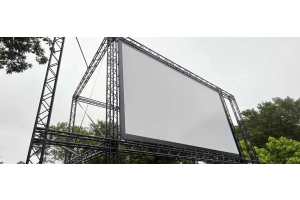
- High-Power Data Projectors: Useful for long walls and wide halls where guests spread far across the room.
- Modular LED TV Screens: Sharp screens work best inside brightly lit trade booths, small workshops, or tight corners.
- Stage and Mood Lighting: Soft front lights show up speakers clearly. Battery-powered LED panels add colour to plain walls without trailing long cables across main walkways.
Proper stage decks and high stands give people sitting right at the back an easy, direct view of the main floor.
4. Why Technical Logistics Matter More Than You Think
Having good gear on hand is only part of the task. Strict load-in schedules, neat cable paths, and live desk management keep your overall programme running right on time.
Logistics Checklist for Event Day:
- Bump-in Timeframe: Check exact times when our team can enter the hall to run leads and lay down heavy safety covers.
- Tech Rehearsals: Test all mics with your speaker early. Run test slides on your presentation laptop to catch scaling mistakes early.
- On-Site Support: Having a tech operator near the desk keeps volume smooth so you can stay focused on your visitors.
Our team at Wwave Audio Visual takes care of transport, gear assembly, and fast end-of-day teardowns so you never need to untangle cords or configure complex boards yourself.
Conclusion: Partner with Wwave Audio Visual for Flawless Execution
Running a great function does not mean you have to work out complex technical problems on your own. Looking at your room layout early, picking accurate equipment packages, and relying on steady field support helps your event run smoothly.
At Wwave Audio Visual, we bring two decades of practical event work to provide dependable gear hire, custom stage setups, and complete event production services all across Melbourne. Reach out to our team today to go over your event ideas, get a detailed quote, and let us manage your technical setup with total care.
-
August 03, 2026
15 Common AV Mistakes That Can Ruin an Event (And How to Avoid Them)
Read more »No matter how well an event is planned, poor audio visual (AV) execution can quickly undermine the experience. A microphone that stops working, blurry presentation slides, poor lighting, or technical delays can distract attendees and leave a lasting negative impression.
Whether you're organising a corporate conference, product launch, exhibition, awards night, or hybrid event, avoiding common AV mistakes is essential for delivering a professional and memorable experience.
Here are 15 of the most common AV mistakes—and how you can avoid them.
1. Booking AV Services at the Last Minute
Leaving AV arrangements until the final weeks can limit equipment availability and increase costs. Booking early allows time for planning, site inspections, and equipment testing.
2. Choosing Equipment Based on Price Alone
The cheapest option isn't always the best value. Reliable equipment, experienced technicians, and responsive support often make the biggest difference during live events.
3. Not Conducting a Venue Site Inspection
Every venue has unique power requirements, lighting conditions, ceiling heights, and acoustic challenges. A site visit helps identify potential issues before event day.
4. Underestimating Audio Requirements
Poor sound quality is one of the most common complaints at events. Ensure the sound system is suitable for your audience size and venue layout.
5. Selecting the Wrong Display Solution
Using a projector in a brightly lit venue can make presentations difficult to see. In many cases, an LED video wall offers better visibility and audience engagement.
6. Ignoring Lighting Design
Lighting does more than illuminate a stage—it enhances visibility, sup
Recent Posts