We use cookies to make your experience better. To comply with the new e-Privacy directive, we need to ask for your consent to set the cookies. Learn more.

Commercial AV Installation in Melbourne: What Businesses Need for Meeting Rooms and Conference Spaces
Modern meeting rooms and conference spaces need reliable audiovisual systems to support presentations, video meetings, training sessions and collaboration. Poor sound quality, difficult screen sharing and incompatible equipment can interrupt meetings and waste employees' time.
A well-planned commercial AV installation helps businesses create spaces where staff, clients and remote participants can communicate more effectively. The right solution depends on the room size, how the space is used, the technology already in place and the organisation's future requirements.
For businesses considering commercial AV installation in Melbourne, understanding these factors can make it easier to plan a system that meets practical needs without paying for unnecessary equipment.
What Is Included in a Commercial AV Installation?
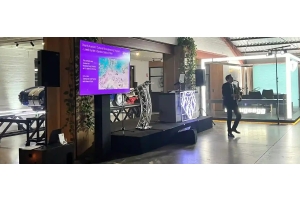
Commercial AV installation involves selecting, configuring and integrating audiovisual equipment for a workplace, meeting room, training facility or conference space. Depending on the project, this may include displays, projectors, speakers, microphones, connection systems and room controls.
Some businesses need a straightforward presentation system, while others require a more integrated setup for hybrid meetings, multiple input sources or larger conference environments.
Wwave offers a range of audiovisual services and installation-related solutions. The precise scope, suitability and availability of a permanent installation project should be confirmed directly with the provider.
Choosing the Right Display for Your Meeting Room
Commercial Displays and Screens
A display should be large enough for everyone in the room to read presentations, spreadsheets and other shared content. Viewing distance, room layout, ambient light and the type of content all influence the appropriate size and specification.
Commercial displays may suit frequently used meeting rooms where clear text and convenient connectivity are priorities. Larger rooms may require a larger display or multiple screens so that participants can see information from different seating positions.
Projectors for Larger Spaces
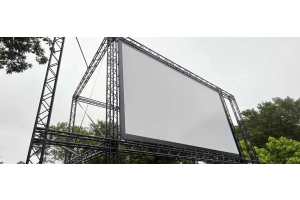
Projectors can be suitable for training rooms, larger presentations and environments where a large projected image is required. Their effectiveness depends on screen size, projector brightness, room lighting, throw distance and the available installation position.
The choice between a projector and a display should be based on the actual room conditions and intended use, rather than price or screen size alone.
Businesses can review Wwave's audiovisual hire and presentation equipment options when assessing possible equipment configurations.
Planning Audio for Clear Communication
Audio quality is particularly important in conference rooms and hybrid meetings. Participants need to hear speakers clearly without excessive echo, background noise or uneven volume.
The room's dimensions, furniture, surface materials and seating arrangement influence the choice and placement of microphones and speakers. A small meeting room may need a relatively simple arrangement, whereas a larger conference room could require several microphones or a more carefully designed audio system.
Before selecting equipment, identify whether meetings will involve in-room presentations, remote participants, group discussions or a combination of these activities. Testing the system under realistic meeting conditions helps identify issues before the room is used regularly.
Supporting Video Conferencing and Screen Sharing
Businesses increasingly use meeting rooms for a mixture of in-person and remote collaboration. A suitable AV system should make it straightforward to share content, communicate with remote participants and switch between common meeting activities.
During planning, consider:
- The video conferencing platforms used by the organisation.
- Whether staff connect personal laptops or dedicated room computers.
- Wired and wireless presentation requirements.
- Camera positioning and microphone coverage.
- Network connectivity and compatibility with existing IT systems.
- The level of room control and automation required.
Confirm compatibility before purchasing or installing equipment. Where AV systems depend on business networks, room computers or conferencing software, coordinate with the IT team to reduce integration problems.
Installation, Integration and Ongoing Maintenance
A successful installation involves more than mounting screens and connecting cables. Equipment positioning, cable management, power requirements, configuration, user controls and testing all affect the final result.
A professional installation plan should establish the location of each device, how cables will be routed, how users will connect their equipment and how the system will be maintained.
It should also account for accessibility, ventilation, safe mounting and any building or electrical requirements. Electrical work and structural mounting must be carried out by suitably qualified professionals where required.
After installation, test typical meeting scenarios, including presentations, audio playback, video calls and switching between input sources. Provide staff with straightforward operating instructions so that they can use the system confidently.
Wwave's audiovisual services provide a starting point for discussing equipment and technical requirements. Confirm the proposed installation scope, commissioning process, maintenance arrangements and support terms before proceeding.
How Much Does Commercial AV Installation Cost?
There is no single price for commercial AV installation because the final cost depends on the equipment, room size, installation complexity and integration requirements.
Factors that can affect the budget include:
- The number and specifications of displays or projectors.
- Microphones, speakers, cameras and conferencing equipment.
- Mounting hardware, cable routes and installation labour.
- Control systems and integration with existing technology.
- Electrical or network changes that may be required.
- Testing, commissioning, training and ongoing support.
A useful way to compare quotations is to request an itemised scope that explains what equipment and labour are included. Check whether the proposal covers configuration, testing, staff handover and any ongoing support rather than comparing equipment prices alone.
Choosing an AV Installation Provider in Melbourne
The right provider should understand the room's purpose, recommend equipment that meets the requirements and explain the proposed installation clearly.
Ask about relevant project experience, equipment compatibility, installation responsibilities, testing procedures and after-installation support. For projects involving IT networks or building infrastructure, confirm how the provider will coordinate with other contractors and internal teams.
Wwave has experience in audiovisual equipment and installation-related services. Businesses can start by reviewing Wwave's services and discussing their specific requirements before deciding on a project scope.
Discuss Your Commercial AV Requirements with Wwave
A reliable meeting room or conference AV system starts with a clear understanding of how people will use the space. Planning display size, audio coverage, conferencing needs and system controls together can help avoid compatibility problems and unnecessary expenditure.
For businesses in Melbourne considering an AV upgrade or installation, visit Wwave's website to enquire about available services and discuss the requirements of your workplace or venue.
Frequently Asked Questions
1.What equipment is needed for a commercial meeting room AV system?
A typical system may include a display or projector, speakers, microphones, presentation connections and video conferencing equipment. Larger rooms may need multiple displays, additional microphones or a central control system. The correct configuration depends on room size, seating and meeting requirements.
2.Should a business choose a projector or a commercial display?
A commercial display may be suitable for rooms that need clear text, frequent use and straightforward operation. A projector may be appropriate where a larger image is needed or the room is designed for presentations. Room lighting, viewing distance, installation constraints and ongoing maintenance should guide the decision.
3.How long does a commercial AV installation take?
The timeframe depends on the number of devices, room preparation, cable routes, mounting requirements and integration with existing systems. A simple installation may be completed more quickly than a multi-room or complex conference system. Ask the provider for a project schedule after the site and technical requirements have been assessed.
4.Does commercial AV installation include ongoing support?
Support varies by provider and project agreement. Some installations include commissioning and handover, while maintenance, troubleshooting and future upgrades may be separate services. Confirm the support arrangements, warranty terms and response expectations in writing before approving the project.
Recent Posts